MyItura Telemedicine API
Appointment Guide - Complete API Reference for Healthcare Integration
The MyItura Telemedicine API enables seamless integration of audio and video appointments into your healthcare application. This powerful API facilitates remote consultations between patients and healthcare providers, enhancing accessibility and convenience in medical care.
Key Features
- Audio/Video Appointments: Conduct secure, high-quality telehealth consultations
- Call Summaries: Automatically generate comprehensive summaries of each appointment
- Clinical Summary: Detailed medical summary for healthcare providers (
transcriptionSummary) - Patient Summary: Simplified, patient-friendly summary (
patientSummary)
- Clinical Summary: Detailed medical summary for healthcare providers (
- Doctor's Notes: Allow physicians to create and manage digital clinical notes
- E-Prescriptions: Enable secure electronic prescription creation and management
- Call Recordings: Access audio recordings of completed appointments
- AI-Powered Transcription: Automatic transcription and summarization of appointment sessions
Whether you're building a patient portal, a clinic management system, or a comprehensive healthcare platform, the MyItura Telemedicine API provides the tools you need to incorporate robust telemedicine capabilities into your solution.
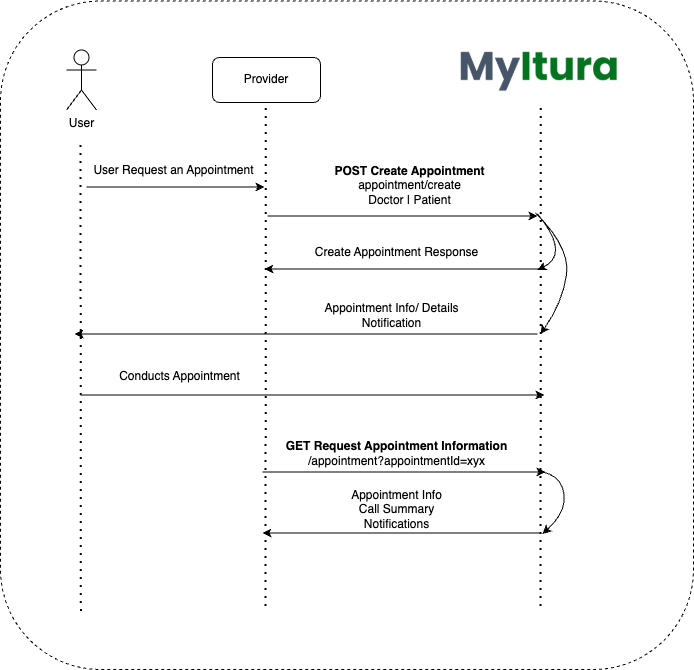
https://URL/api/v1/appointmentAppointment Flow
Authentication
All API requests require authentication using your API Keys.
Required Headers
| Header | Description | Example |
|---|---|---|
x-api-public-key | Your public API key | pk_live_abc123 |
x-api-secret-key | Your secret API key | sk_live_xyz789 |
Getting Your API Keys
- Login to your organization dashboard at MyItura Portal
- Navigate to Settings → API Keys
- Click "Generate New API Keys"
- Copy both your Public Key and Secret Key
- Store them securely (e.g., environment variables)
pk_ and your secret key starts with sk_Create Appointment
The Create Appointment endpoint allows you to schedule a new telemedicine appointment in the MyItura system. This endpoint enables the creation of audio/video consultations between patients and healthcare providers. When called, it sets up the appointment with essential details such as the participants information, the scheduled start time and the scheduled end time. Upon successful creation, the system returns a unique appointment ID and a URL for each participant to join the virtual meeting.
/appointment/createCode Example
Response
Get Single Appointment
The Get Appointment endpoint allows you to retrieve information about a scheduled appointment. Using this endpoint you will be able to view the created audio/video consultations.
/appointment?appointmentId={id}Code Example
Response
Response Field Descriptions
| Field | Type | Description |
|---|---|---|
transcriptionSummary | string | Clinical summary for healthcare providers - detailed medical information |
patientSummary | string | Simplified summary for patients - easy-to-understand visit summary |
audioRecordingURLs | array | Array of URLs to download call recordings (available after appointment completion, may contain multiple files if session was split) |
prescriptions | array | List of prescriptions issued during the appointment |
doctorNotes | array | Clinical notes documented by the healthcare provider |
prescriptionUrl | string | URL to downloadable PDF prescription document |
Get All Appointments for Organization
/appointment/organisation?limit=10&page=2Query Parameters
| Parameter | Type | Required | Default | Description |
|---|---|---|---|---|
page | number | No | 1 | Page number for pagination |
limit | number | No | 10 | Number of items per page |
appointmentStatus | string | No | - | Filter by status (e.g., "scheduled", "completed", "cancelled") |
startDate | string | No | - | Filter from date (YYYY-MM-DD format) |
endDate | string | No | - | Filter to date (YYYY-MM-DD format) |
Code Example
Response
Cancel Appointment
Cancel a scheduled appointment. You can only cancel appointments that are scheduled to start more than 5 minutes in the future.
/appointment/cancel?appointmentId={id}Code Example
Success Response
Error Response
Reschedule Appointment (Modify Time)
Modify the start and end time of a scheduled appointment.
/appointment/modify-time?appointmentId={id}Code Example
Success Response
Error Response (Past Time)
Error Handling
HTTP Status Codes
| Code | Status | Description |
|---|---|---|
200 | OK | Request succeeded |
400 | Bad Request | Invalid request parameters or attempting to cancel/modify past appointments |
401 | Unauthorized | Invalid or missing API keys |
404 | Not Found | Appointment or resource not found |
Important Notes
Authentication
All requests require valid API keys (Public Key and Secret Key) in headers
Date Format
- Appointment times use ISO 8601 format (e.g.,
2025-11-10T09:00:00.000Z) - Date filters use YYYY-MM-DD format (e.g.,
2025-11-10)
Pagination
Default is 10 items per page starting at page 1
Appointment Status
Common values are "scheduled", "completed", "cancelled", "in-progress"
Post-Appointment Data Availability
audioRecordingURLs: Available approximately 30 minutes after appointment ends (may contain multiple recordings if session was split)transcriptionSummary: Available after audio transcription completes (typically 35-45 minutes post-appointment)patientSummary: Available after AI summarization completes (typically 35-45 minutes post-appointment)prescriptions: Available immediately after doctor submits prescription during or after appointmentdoctorNotes: Available immediately after doctor submits notes during or after appointment
AI-Generated Summaries
- Both summaries are automatically generated using advanced AI technology
transcriptionSummary: Clinical format for healthcare providers with medical terminologypatientSummary: Simplified format for patients, written in plain language- Summaries include information from doctor's notes and prescriptions when available
MediLoan Integration
Loan Initiation
The content here describes how to initiate a loan via the SDK endpoint. This is the first step in the MediLoan process where the Organization (Hospital/HMO) initiates a request.
/sdk/loans/initiateRequest Parameters
| Field | Type | Required | Description |
|---|---|---|---|
clientReference | string | Yes | Unique identifier for this initiation in your system. |
invoiceReference | string | No | Reference to the invoice being funded. Can be duplicated. |
firstName | string | Yes | First name of the patient/applicant. |
phoneNumber | string | Yes | Phone number of the patient. Formats: 080..., 234..., +234... |
treatment | string | Yes | Description of the treatment or service. |
treatmentAmount | number | Yes | Amount in minor currency unit (e.g., kobo for NGN). |
Code Example
Response
Webhook Integration
The MyItura MediLoan Webhook API allows your system to receive real-time notifications about loan life-cycle events initiated through your platform.
Security & Verification
To ensure that webhook requests originate from MyItura and have not been tampered with, every request includes a cryptographic signature in the header.
| Header | Description |
|---|---|
X-MyItura-Event | The type of event (e.g., loan.initiated). |
X-MyItura-Signature | The HMAC-SHA256 signature of the request body. |
Signature Verification Example
Event Types
loan.initiated: Triggered when a loan application is started.loan.application.submitted: Triggered when KYC is completed.loan.approved: Triggered when an admin approves the loan.loan.rejected: Triggered when the loan is rejected.loan.offer.accepted: Triggered when the user signs the offer.loan.disbursed: Triggered when funds are transferred.
Payload Example (loan.initiated)
{
  "event": "loan.initiated",
  "timestamp": "2024-01-08T14:30:00Z",
  "data": {
    "sdkReference": "SDK-A1B2C3D4",
    "clientReference": "YOUR_SYSTEM_REF_123",
    "invoiceReference": "INV-001",
    "status": "pending",
    "amount": 5000000,
    "currency": "NGN",
    "applicant": {
      "firstName": "John",
      "lastName": "Doe",
      "gender": "male"
    },
    "applicationUrl": "https://apply.myitura.com/loan?ref=SDK-A1B2C3D4"
  }
}
Lending Partner SDK
The Lending Partner SDK is for credit providers who underwrite on their own side and lend to MyItura patients. You push a credit decision, we turn it into a loan with a signed offer letter, your borrower accepts, and the funds land as a ring-fenced credit balance they can put toward healthcare on MyItura. Your book stays yours: the capital is your pool, the borrowers are your borrowers, and every event is mirrored back to you.
It uses the same SDK key pair as the MediLoan endpoints above, so if you are already integrated there, you are already authenticated here. Where MediLoan initiation hands a patient to MyItura's own lending, this is the reverse: you are the lender, and MyItura provides the rails.
5000000. The one exception is the payload you push us: Cortex decisions carry naira, and we convert them at the boundary. Never do money arithmetic in floats.The lifecycle
A pre-approval moves through: received → offer_issued → accepted | declined | expired → disbursed. A decision you push as a decline is recorded as declined immediately and never becomes a loan. We keep it so your funnel and score history are complete.
- Push a decision:
POST /v1/preapprovalswith your Cortex payloads verbatim. Idempotent onassessment_id. - Issue the offer:
POST /v1/preapprovals/{id}/issue-offer(or automatically, if auto-issue is enabled for you). We render a tenant-branded offer letter and emitloan.offer.issuedwith a signed link to the PDF. - Your borrower accepts, through our hosted checkout, or relayed by you via
POST /v1/loans/{id}/accept-terms. Acceptance is always required before any money moves. - Disburse:
POST /v1/loans/{id}/disbursedraws from your prefunded pool into the borrower's credit balance. - Collect and record: debit on your own rail, then record it with
method: "external".
Approving directly
If you originate loans yourself rather than pushing pre-approvals, POST /v1/loans/{id}/approve and POST /v1/loans/{id}/reject are yours, both taking an optional notes or reason. Approving prices the loan, freezes its pricing snapshot, builds the schedule and issues the offer.
On a delegated-tier (Tier A) product you attest that you verified the borrower. Send that with the approval rather than as a separate call:
POST /v1/loans/{id}/approve

{
  "notes": "Approved on our own underwriting",
  "attestation": {
    "schemaVersion": 1,
    "attestedChecks": {
      "identityVerified": true,
      "addressVerified": true,
      "sanctionsScreened": true
    }
  }
}
We record the attestation, run our AML screen, and only then approve. The response tells you which happened:
{
  "data": {
    "approved": true,
    "loan": { "id": "...", "status": "awaiting_acceptance" },
    "attestation": { "amlScreenStatus": "clear" }
  }
}

// Screen hit: recorded, but NOT approved.
{
  "data": {
    "approved": false,
    "attestation": { "amlScreenStatus": "hit" }
  }
}under_review for a human at MyItura and issues no offer, so approved: false comes back with 200: there is nothing to retry. The same verdict is pushed as loan.kyc.attested, which is what to listen for if you approve asynchronously. Attesting separately with POST /v1/loans/{id}/attestation still works.Authentication
Same credentials as the rest of the MyItura API: send your key pair as X-API-Public-Key and X-API-Secret-Key, or as a single Authorization: ApiKey <public>:<secret> header. Your organisation is always derived from the credential, never from anything in the path, query or body, so you can only ever read and write your own data.
Access to the pre-approval endpoints additionally requires the Pre-Approved Lending permission on your organisation, granted by MyItura when your program goes live. Without it these endpoints return 403 PREAPPROVED_LENDING_PERMISSION_DENIED.
Providers Directory
Lists the active MyItura healthcare providers (laboratories and pharmacies), so you can reference one as providerId when you push a decision. It serves exactly the public patient-facing directory: no permissions, contact details or configuration.
GET /v1/providers
Loan Products
A product is the template a loan is priced and governed by: interest, fees, limits, and where the money settles. Your products are agreed with MyItura and set up by your staff on the dashboard. Over the API they are read-only, so you can look up the productId to reference on a push.
GET /v1/products
productId to POST /v1/preapprovals/{id}/issue-offer only when you deliberately want to override that choice.Pre-Approvals
Push each Cortex decision as it is made. Send the decision and enriched payloads verbatim. We read what we need, keep the rest for audit, and scrub raw BVNs before anything is stored.
POST /v1/preapprovals
What we read from your decision
| Your field | Required | Becomes |
|---|---|---|
metadata.assessment_id | Yes | The idempotency key. Replaying it returns the original record. |
metadata.bvn | Yes | Matched against verified MyItura KYC to link an existing user; stored only as a keyed hash. Required on every decision: it is the only identifier that ties a borrower to bureau data and to a verified MyItura user. A metadata.nin is accepted and kept when you have one, but is never required, since Cortex decisions are BVN-keyed. |
decision.recommendation | Yes | decline is recorded and stops there; anything else is eligible for an offer. |
decision.approved_amount | For offers | The loan principal. Naira → approvedAmountKobo. |
decision.conditions.interest_rate | For offers | The rate charged (percent → basis points), subject to your agreed cap. |
decision.conditions.tenor_days | For offers | The loan tenor. Without it we cannot price the loan and no offer can be issued. |
trust_score.score / breakdown.risk_band | No | Recorded for your funnel and audit history. |
GET /v1/preapprovals?status=received&limit=50 lists yours, and GET /v1/preapprovals/{id} fetches one. The raw payloads are never echoed back.Offers & Acceptance
Issuing an offer creates the loan on your pushed terms and renders a branded offer letter PDF. We emit loan.offer.issued carrying a short-lived signed link. Relay the document to your borrower for acceptance.
POST /v1/preapprovals/{id}/issue-offer
GET /v1/loans/{id}/offer-letter for a fresh link. Once accepted, the stored letter is re-rendered with the signature block.Accept or decline
Your borrower can accept through our hosted checkout, or you can relay their decision: POST /v1/loans/{id}/accept-terms or POST /v1/loans/{id}/decline-terms (optionally with reason). Both are terminal for the offer, and a declined loan cannot be revived, so push a fresh decision instead. Only after acceptance will POST /v1/loans/{id}/disburse release funds.
Cancelling a loan
POST /v1/loans/{id}/cancel, optionally with {"reason": "..."}, calls a loan off. It is idempotent, and the reason is recorded on the loan and carried on the loan.cancelled event.
This is broader than declining. Declining answers an offer that is currently on the table; cancelling works from the moment a loan exists right up to disbursement, including while it is still waiting on KYC or approval, when there is no offer to decline. Your borrower can also cancel themselves from the hosted checkout, so the event carries cancelledBy (tenant, borrower or admin): both land on cancelled, and you will want to tell them apart when you reconcile.
400: the money is with your borrower, so the loan has to run to completion, default or recovery. If you want an escape hatch after disbursement, that is a repayment, not a cancellation.Recording Repayments
You run collections on your own direct-debit rail. When a debit succeeds, record it against the loan. That is what returns principal to your pool and settles the cost of credit.
POST /v1/loans/{id}/repayments
Methods
| Method | Use it when |
|---|---|
external | Your default. You collected on your own rail and are recording the result. Idempotent on externalReference, so it is safe to retry. |
cash_wallet | Debit the borrower's own MyItura cash wallet (what their bank transfer pays into). Requires a claimed MyItura account with sufficient balance. |
wallet | Sweep the borrower's undrawn credit back to your pool, not a collection from the borrower. |
mandate | Only for MyItura-operated Paystack mandates. Not available for partner-run direct debit. |
Repayments settle in strict order: fees, then interest, then principal, and any amount beyond what is outstanding is not allocated. Each one advances the schedule and emits loan.repayment.completed; the final one completes the loan and emits loan.completed.
Mandates
POST /v1/loans/{id}/mandates creates a direct-debit mandate. email is required; bankCode, accountNumber and callbackUrl are optional.
POST /v1/loans/{id}/mandates
activate accepts no body. An authorisation code is proof that one specific person allowed one specific account to be debited, so the only one we trust is the one we read back from the provider ourselves. Send the borrower to the URL; we do the rest.{"provider": "creditcheck"} records that your own direct debit is in force. Nothing is initialised with Paystack, there is no authorizationUrl and nothing to activate: it is a status marker only, we hold no authorisation and never debit it. Keep recording your collections with method: "external".Webhooks
Register endpoints with POST /v1/webhook-endpoints. The signing secret (whsec_…) is returned once and never again. Every delivery is {"event", "timestamp", "data"} signed with HMAC-SHA256.
An endpoint receives every event unless you send an events list, which is matched on exact names: loan.* is not a pattern, and an endpoint filtered to loan.approved will not receive loan.offer.issued. List each event you want, or omit events entirely.
Verifying a delivery
Events
| Event | Meaning |
|---|---|
preapproval.received | We stored your pushed decision. Use it to prove your receiver works end to end. |
preapproval.expired | An unconsumed decision lapsed before an offer was issued. |
loan.approved | The loan was created and priced on your terms. Carries offerLetterUrl (short-lived) and assessmentId, so subscribing to this event alone is enough to act on an approval. |
loan.offer.issued | The offer letter is ready. Same payload as loan.approved, fired immediately after it. Relay it to your borrower. |
loan.offer.accepted | Terms accepted, so the loan can now be disbursed. |
loan.offer.declined | Your borrower turned the offer down. Terminal. |
loan.cancelled | Called off before disbursement. Carries cancelledBy (tenant, borrower or admin) and the reason. Terminal. |
loan.kyc.attested | Our AML screen ran on your attestation. Carries amlScreenStatus: on a hit the loan goes to under_review and no offer is issued, so this is how you learn a loan has stalled. |
loan.disbursed | Funds released from your pool into the borrower's credit balance. |
loan.repayment.completed | A repayment settled; carries the new outstandingKobo. |
loan.completed | Fully repaid. |
loan.defaulted | Recovery escalated the loan to default. |
Every payload is tagged with its mode (live/test) and is only delivered to endpoints registered for that mode, so test traffic can never reach a live receiver. Failures retry with exponential backoff; repeated failures disable an endpoint. Inspect and requeue with GET /v1/events and POST /v1/events/{id}/redeliver.
Reconciliation
One call gives you the whole program: what you pushed, what converted, and what the money is doing. It counts only loans that came from your pushed decisions.
GET /v1/preapprovals/funnel
Settlements
GET /v1/settlements lists the statements for what MyItura owes you: gross collected, less the platform fee, equals net payable. GET /v1/settlements/{id} fetches one, and GET /v1/settlements/{id}/csv returns the same statement as CSV for your finance team to reconcile line by line.
Your loan book
GET /v1/loans is your book, paginated and filterable. Only ever your own loans: the organisation comes from your credential, so there is no tenant id to pass and no way to ask for anyone else's.
GET /v1/loans
GET /v1/loans/{id} is the full loan. GET /v1/loans/{id}/schedule and GET /v1/loans/{id}/repayments give the instalments and what has been collected against them. GET /v1/usage?days=30 is your own API usage rollup.
POST /v1/loans/{id}/disburse, and topping up is a signed-in action for your staff.Idempotency & Errors
Send an Idempotency-Key header on every POST, especially money movements. The first request executes and its response is cached per key; retries replay it with Idempotent-Replayed: true. Reusing a key on a different method or path returns 409, as does retrying while the original is still in flight. Transient 5xx outcomes are not cached, so they are always safe to retry.
Pushes and collections carry their own natural keys too: assessment_id for a decision, externalReference for a repayment, so a replay is a no-op even without the header.
| Status | What it means |
|---|---|
202 | Decision received and stored. |
200 | Idempotent replay: we already had this assessment. |
401 | Missing or invalid API credentials. |
403 | Your organisation lacks Loan Tenant or Pre-Approved Lending, or the push is not enabled for your tenant. |
404 | Not found within your organisation: another tenant's records are never visible. |
409 | Idempotency key conflict. |
422 | The payload is malformed or unusable (e.g. no assessment_id, or an amount we cannot convert). |
429 | Rate limited, so back off and retry. |